NEWS
Showing posts with label AJAX. Show all posts

Wednesday, July 27, 2011

Making Web Services Accessible from Script

In order for a Web service to be accessed from script, it must be an .asmx Web service whose Web service class is qualified with the ScriptServiceAttribute attribute. Individual methods to be called from script must be qualified with the WebMethodAttribute attribute.


The following example shows these attributes in Web service code.


[ScriptService]
public class SimpleWebService : System.Web.Services.WebService
{

[WebMethod]
public string EchoInput(String input)
{
// Method code goes here.
}
}

To enable Web service calls from script, 
you must register the ScriptHandlerFactory HTTP handler in the application's
 Web.config file. The handler processes calls made from script to .asmx 
Web services. 
The following example shows the Web.config element for adding the handler. 


type="System.Web.Script.Services.ScriptHandlerFactory"
validate="false"/>


For Web service calls that are not issued from ASP.NET AJAX script,
the ScriptHandlerFactory handler delegates the call to the default handler,
which uses SOAP instead of JSON format.
The delegation is performed automatically and you do not have to take any
action unless you want to disable the use of the SOAP protocol for the Web
services. In that case, you must enter the following configuration setting
in the Web.config file.

Using Web Services in ASP.NET AJAX

This topic describes how to access Web services from client script in AJAX-enabled ASP.NET Web pages. The services can be either custom services that you create, or built-in application services. The application services are provided as part of ASP.NET AJAX, and include authentication, roles, and profile services.

Custom Web services can be in the form of .ASP.NET Web services (.asmx services), or Windows Communication Foundation (WCF) services (.svc services).
 
ASP.NET enables you to create Web services that can be accessed from client script in Web pages. The pages communicate with the server through a Web service communication layer that uses AJAX technology to make Web service calls. Data is exchanged asynchronously between client and server, typically in JSON format.
 

Client-Server Communication for AJAX Clients

In AJAX-enabled Web pages, the browser makes an initial request to the server for the page, and then makes subsequent asynchronous requests to Web services for data. The client communication elements are in the form of downloaded proxy classes from the server and the core client-script library. The server communication elements are handlers and custom services. The following illustration shows the elements that are involved in the communication between the client and the server.

AJAX Client Architecture

Browsers call Web service methods by using proxy classes. A proxy class is a script that is automatically generated by the server and downloaded to the browser at page-load time. The proxy class provides a client object that represents the exposed methods of a Web service.

To call a Web service method, client script calls the corresponding methods of the proxy class. The calls are made asynchronously, through the XMLHTTP object.

The Web service communication layer contains the library script types that enable the proxy classes to make service calls. For more information, see the classes that are contained in the Sys.Net namespace.

The code in the proxy classes and in the core Web service communication layer hides the complexity of XMLHTTP and the differences between browsers. This simplifies the client script that is required to call the Web service.

There are two approaches to making a Web service request:

Call Web services by using the HTTP POST verb. A POST request has a body that contains the data that the browser sends to the server. It does not have a size limitation. Therefore, you can use a POST request when the size of the data exceeds the intrinsic size limitation for a GET request. The client serializes the request into JSON format and sends it as POST data to the server. The server deserializes the JSON data into .NET Framework types and makes the actual Web service call. During the response, the server serializes the return values and passes them back to the client, which deserializes them into JavaScript objects for processing.

Call Web services by using the HTTP GET verb. This resembles the functionality of a POST request, with the following differences:

The client uses a query string to send the parameters to the server.

A GET request can call only a Web service method that is configured by using the ScriptMethodAttribute attribute.

Data size is limited to the URL length allowed by the browser.
 
AJAX Client Architecture
 
Elements of the client architecture include the Web service communication layer in the core library and the downloaded proxy classes for the services that are used on the page. Individual elements shown in the figure are as follows:


Custom Service Proxy Classes. These consist of client script that is automatically generated by the server and downloaded to the browser. The proxy classes provide an object for each WCF or ASMX service that is used in the page. (That is, they provide an object for each item in the ServiceReferences element of the ScriptManager control in the page.) Calling a proxy method in client script creates an asynchronous request to the corresponding Web service method on the server.

Authentication Proxy Class. The AuthenticationService proxy class is generated by the server authentication application service. It enables the user to log on or log out through JavaScript in the browser without making a round trip to the server.

Role Proxy Class. The RoleService proxy class is generated by the server roles application service. It enables you to group users and treat each group as a unit through JavaScript without making round trips to the server. This can be useful to enable or deny access to resources on the server.

Profile Proxy Class. The ProfileService class is generated by the server profile application service. It makes the current user's profile information available to the client through JavaScript without making round trips to the server.

Page Methods Proxy Class. This provides the scripting infrastructure for client script to call static methods in an ASP.NET page as if they were Web service methods. For more information, see Calling Web Services from Client Script.

Web Service Communication Layer. This is the library that contains the client script types. These types enable the browser (client) to communicate with the services on the server. They also shield client applications from the complexities of establishing and maintaining the asynchronous communication between client and server. They encapsulate the browser XMLHTTP object that provides the asynchronous capability, and enable client applications to be browser independent. The following are the main elements of the Web service communication layer:

WebRequest . This provides client script functionality to make a Web request. For more information, see the WebRequest class.

WebRequestManager . This manages the flow of the Web requests issued by the WebRequest object to the associated executor object. For more information, see the WebRequestManager class.

XmlHttpExecutor . This makes asynchronous network requests by using the browser's XMLHTTP support. For more information, see the XmlHttpExecutor class.

JSON Serialization. This serializes JavaScript objects into JSON format. Deserialization is available by using the JavaScript eval function. For more information, see the JavaScriptSerializer class.

The default serialization format is JSON, but individual methods in Web services and in ASP.NET Web pages can return alternative formats such as XML. The serialization format of a method can be specified with attributes. For example, for an ASMX service, you can set the ScriptMethodAttribute attribute to cause a Web service method to return XML data, as shown in the following example:
 
[ScriptMethod(ResponseFormat.Xml)]


AJAX Server Architecture

Elements of the server architecture include the Web service communication layer with a HTTP handler and serialization classes, custom services, page methods, and application services. Individual elements shown in the figure are as follows:

Custom Web Services. These provide the service functionality that you implement and return the appropriate response to the client. Custom Web services can be ASP.NET or WCF services. The Web service communication layer automatically generates client-script proxy classes that can be called asynchronously from client script.

Page Methods. This component enables a method in an ASP.NET page to be called as if it were a Web service method. Page methods must be defined in the page that is performing the page-method call.

Authentication Service. The authentication service generates an authentication proxy class that enables the user to log on or log out through client JavaScript. This application service is always available and you do not have to instantiate it. For more information, see Using Forms Authentication with ASP.NET AJAX.

Role Service. The role service generates a role proxy class that enables client JavaScript to access roles information for the currently authenticated user. This application service is always available and you do not have to instantiate it. For more information, see Using Roles Information with ASP.NET AJAX.

Profile Service. The profile service generates a profile proxy class that enables client JavaScript to get and set profile properties for the user that is associated with the current request. This application service is always available and you do not have to instantiate it. For more information, see Using Profile Information with ASP.NET AJAX.

JSON Serialization. The server JSON serialization component enables customizable serialization and deserialization of common .NET Framework types to and from JSON format. For more information, see JavaScriptSerializer.

XML Serialization. The Web service communication layer supports XML serialization for SOAP requests to Web services and for returning XML types from a JSON request to a Web service.


Tuesday, July 26, 2011

Implementing Client Callbacks Programmatically Without Postbacks in ASP.NET Web Pages

In the default model for ASP.NET Web pages, the user interacts with a page and clicks a button or performs some other action that results in a postback. The page and its controls are re-created, the page code runs on the server, and a new version of the page is rendered to the browser. However, in some situations, it is useful to run server code from the client without performing a postback. If the client script in the page is maintaining some state information (for example, local variable values), posting the page and getting a new copy of it destroys that state. Additionally, page postbacks introduce processing overhead that can decrease performance and force the user to wait for the page to be processed and re-created.

To avoid losing client state and not incur the processing overhead of a server roundtrip, you can code an ASP.NET Web page so that it can perform client callbacks. In a client callback, a client-script function sends a request to an ASP.NET Web page. The Web page runs a modified version of its normal life cycle. The page is initiated and its controls and other members are created, and then a specially marked method is invoked. The method performs the processing that you have coded and then returns a value to the browser that can be read by another client script function. Throughout this process, the page is live in the browser.

Several Web server controls can use client callbacks. For example, the TreeView control uses client callbacks to implement its populate-on-demand functionality. For more information see TreeView Web Server Control Overview.
 
There are several options for automating client callbacks in an ASP.NET Web page. AJAX features in ASP.NET such as the UpdatePanel server control can automate asynchronous partial-page updates for you, and the Web service communication feature can automate asynchronous Web service calls.
 
For an overview of AJAX features in ASP.NET that automate client callbacks for you, see the following topics:

 
Components of Client Callbacks


Creating an ASP.NET page that programmatically implements client callbacks is similar to creating any ASP.NET page, with a few these differences. The page's server code must perform the following tasks:

Implement the ICallbackEventHandler interface. You can add this interface declaration to any ASP.NET Web page.

Provide an implementation for the RaiseCallbackEvent method. This method will be invoked to perform the callback on the server.

Provide an implementation for the GetCallbackResult method. This method will return the callback result to the client.

In addition, the page must contain three client script functions that perform the following actions:

One function calls a helper method that performs the actual request to the server. In this function, you can perform custom logic to prepare the event arguments first. You can send a string as a parameter to the server-side callback event handler.

Another function receives (is called by) the result from the server code that processed the callback event, accepting a string that represents the results. This is referred to as the client callback function.

A third function is the helper function that performs the actual request to the server. This function is generated automatically by ASP.NET when you generate a reference to this function by using the GetCallbackEventReference method in server code.
Both client callbacks and postbacks are requests for the originating page. Therefore, client callbacks and postbacks are recorded in Web server logs as a page request.
 
Implementing the Required Interfaces in Server Code


You can declare the ICallbackEventHandler interface as part of the class declaration for the page. If you are creating a code-behind page, you can declare the interface by using syntax such as the following.
 
public partial class CallBack_DB_aspx :
System.Web.UI.Page, System.Web.UI.ICallbackEventHandler
 
If you are working in a single-file page or user control, you can add the declaration by using an @ Implements directive in the page, as in the following examples


Creating a Server Callback Method

In server code, you must create a method that implements the RaiseCallbackEvent method and a method that implements the GetCallbackResult method. The RaiseCallbackEvent method takes a single string argument instead of the usual two arguments that are typically used with event handlers. A portion of the method might look like the following example:

public void RaiseCallbackEvent(String eventArgument)
{


}
 
The GetCallbackResult method takes no arguments and returns a string. A portion of the method might look like the following example:
 
public string GetCallbackResult()
{
return aStringValue;
}
 
Creating Client Script Functions
You must add client script functions to the page to perform two functions: send the callback to the server page, and receive the results. Both client script functions are written in ECMAScript (JavaScript).

Sending the Callback

The function to send the callback is generated in server code. The actual callback is performed by a library function that is available to any page that implements the ICallbackEventHandler interface. You can get a reference to the library function by calling the page's GetCallbackEventReference method, which is accessible through the ClientScript property of the page. You then build a client function dynamically that includes a call to the return value from the GetCallbackEventReference method. You pass to that method a reference to the page (this in C# or Me in Visual Basic), the name of the argument that you will use to pass data, the name of the client script function that will receive the callback data, and an argument that passes any context you want.

When you have built the function, you inject it into the page by calling the RegisterClientScriptBlock method.

The following example shows how to dynamically create a function named CallServer that invokes the callback.
 
void Page_Load(object sender, EventArgs e)
{
       ClientScriptManager cm = Page.ClientScript;
       String cbReference = cm.GetCallbackEventReference(this, "arg",
                                          "ReceiveServerData", "");
       String callbackScript = "function CallServer(arg, context) {" +
                                            cbReference + "; }";
       cm.RegisterClientScriptBlock(this.GetType(),
                                        "CallServer", callbackScript, true);
}
 
The names of the arguments that are accepted by the function you are generating must match the names of the values that you pass to the GetCallbackEventReference method.

The following example shows some markup that could be used to invoke the callback and process its return value:


onclick="CallServer(1, alert('Callback'))"/>


Receiving the Callback

You can write the client function that receives callbacks statically in the page. The function must be named to match the name that you pass in the call to the GetCallbackEventReference method. The receiving function accepts two string values: one for the return value and an optional second value for the context value that is passed back from the server.

The function might look like the following example:
 
reference:

Tuesday, March 23, 2010

How to call a Web Service from client-side JavaScript using ASP.NET AJAX


Introduction


The ASP.NET AJAX framework provides us with an easy and elegant way to consume Web Services from client-side JavaScript code. In fact, it is even easier to write a simple AJAX enabled Web Service and connect to it from client-side JavaScript than it is to write an article like this one. In this article, I have tried to collect some of my experiences which I hope can be useful for you to get started with using the ASP.NET AJAX technology in general and ASP.NET AJAX enabled Web Services in particular.


Background


Some time ago, I was looking for a possibility to dynamically update some parts of my page without refreshing the rest of it. In fact, I only needed to update some small text fields on my page. Apart from this text, my page had a lot of graphics on it, and it was a bit irritating for users to watch the whole page flashing while those text fields were updated. So, I had to avoid refreshing the graphics on the page while updating my text data. The ASP.NET AJAX technology has shown to be the perfect choice for this purpose. It is possible to use different AJAX techniques to achieve this kind of behaviour, for example: partial page updates, page methods, and Web Service calls. In this article, I will try to cover the Web Service approach.


Installing ASP.NET AJAX


Well, first of all, to get started, you will have to install the ASP.NET AJAX framework. You can do the first step by visiting AJAX: The Official Microsoft ASP.NET 2.0 Site. There, you can find links and pretty good instructions on how to install and get started with ASP.NET AJAX. I am using ASP.NET AJAX version 1.0 while writing this article.


Creating an AJAX Enabled Web Service


Let us assume that you managed to install the ASP.NET AJAX framework. We can now start with creating a new AJAX enabled Web application:
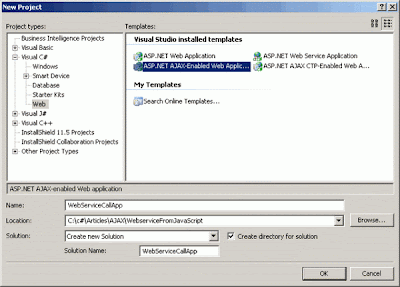


What we need now is the AJAX enabled Web Service. Let us add a new Web Service called MySampleService to the project:


In order to AJAX enable it, we will have to add the following attribute to the Web Service declaration part:


[System.Web.Script.Services.ScriptService()]


When this is done, our Web Service is ready to respond to client-side JavaScript calls. One more thing has to be done here: we need the Web Method that we will call from client-side JavaScript. Let us define it like this:


[WebMethod]
public string GetServerResponse(string callerName)
{
if(callerName== string.Empty)
throw new Exception("Web Service Exception: invalid argument");

return string.Format("Service responded to {0} at {1}",
callerName, DateTime.Now.ToString());
}


Configuring the ASP.NET Application


The ASP.NET application's web.config file also has to be modified in order to enable Web Service calls from client-side JavaScript code.


This modification is made for you by Microsoft Visual Studio 2005 if you are using the ASP.NET AJAX template. Here is an example of what can be inserted into the httpHandlers section of your web.config file:


<configuration>
...
<system.web>
...
<httpHandlers>
<remove verb="*" path="*.asmx"/>
<add verb="*" path="*.asmx" validate="false"
type="System.Web.Script.Services.ScriptHandlerFactory,
System.Web.Extensions, Version=1.0.61025.0,
Culture=neutral, PublicKeyToken=31bf3856ad364e35"
/>
...
</httpHandlers>
...
</system.web>
...
<configuration>


Making Client-side JavaScript Code


Let us take a look at the default.aspx file that was automatically created in our project (if it was not - then you will have to add one manually). First, we have to make sure that we have one and only one instance of the ScriptManager object on our page:


<body>
<form id="form1" runat="server">
<asp:ScriptManager ID="ScriptManager1" runat="server">
</asp:ScriptManager>
<div></div>
</form>
</body>


Then, we have to add a Services collection to our ScriptManager object, add a ServiceReference to the Services collection, and specify the Path to the desired service. The result might look like this:


<body>
<form id="form1" runat="server">
<asp:ScriptManager ID="ScriptManager1" runat="server">
<Services>
<asp:ServiceReference Path="~/WebServices/MySampleService.asmx" />
</Services>
</asp:ScriptManager>
<div></div>
</form>
</body>


or like this, if you prefer to do it directly in your code-behind file:


ScriptManager1.Services.Add(new ServiceReference("~/WebServices/MyWebService.asmx"));


Now, we need some client-side functions, a button to trigger the Web Service request, and a text box to provide the input for the Web Service:


  • SendRequest - this function will send an asynchronous request to the Web Service


  • OnComplete - this function will receive the result from the Web Service


  • OnError - this function will be triggered if an error occurs while executing the Web Service


  • OnTimeOut - this function will be triggered if the Web Service will not respond


  • MyTextBox- the ext box with the input for the Web Service


  • RequestButton - the button that triggers the SendRequest function


The result might look like this:


<head runat="server">
<title>Web Service call from client-side JavaScript</title>
<script language="javascript" type="text/javascript">
function SendRequest()
{
MySampleService.GetServerResponse(form1.MyTextBox.value, OnComplete, OnError,
OnTimeOut);
}
function OnComplete(arg)
{
alert(arg);
}
function OnTimeOut(arg)
{
alert("timeOut has occured");
}
function OnError(arg)
{
alert("error has occured: " + arg._message);
}
</script>
</head>
<body>
<form id="form1" runat="server">
<asp:ScriptManager ID="ScriptManager1" runat="server">
<Services>
<asp:ServiceReference Path="~/WebServices/MySampleService.asmx" />
</Services>
</asp:ScriptManager>
<div>
<input type="text" value="" id="MyTextBox" />
<input type="button" value="Send Request to the Web Service"
id="RequestButton" onclick="return SendRequest()" />
</div>
</form>
</body>


This is basically it. You have a functioning client-side JavaScript code that calls a server-side Web Service and treats the returned response. If we supply an empty input value to the GetServerResponse method of MySampleService, then as expected, it will throw an exception. This exception will be caught by the OnError function in the client-side JavaScript:


Conclusion


The described client-to-server communication model where the client-side JavaScript code invokes the Web Service methods provides us with a lot of flexibility to extend our website functionality. At the same time, the traffic is minimal: we send only the input data required by the Web Method, and we receive only the return value from the method being invoked.

Monday, March 22, 2010

Core AJAX example using XMLDOM and XMLHttpRequest ActiveX Objects

Javascript:

function GetEmpDetails(obj)
{
if(obj.value!='')
{
var xmlDoc = new ActiveXObject("Microsoft.XMLDOM");
var xmlHttp=new ActiveXObject('Msxml2.XMLHTTP')
xmlHttp.open('GET','ServerPage.aspx?empid=' + obj.value ,false);
xmlHttp.send(null)
//alert(xmlHttp.responseText);
xmlDoc.loadXML(xmlHttp.responseText)
var result = xmlDoc.getElementsByTagName('result');

if(result[0].text==1)
{
var EmpFirstName = xmlDoc.getElementsByTagName('EmpFirstName');
var EmpPreferredFirstName = xmlDoc.getElementsByTagName('EmpPreferredFirstName');
var EmpLastName = xmlDoc.getElementsByTagName('EmpLastName');
var EmpPhoneNum = xmlDoc.getElementsByTagName('EmpPhoneNum');

document.getElementById('ctl00_MainContent_txtHLCName').value = EmpFirstName[0].text + ' ' + EmpLastName[0].text;
document.getElementById('ctl00_MainContent_hdnEmpPreferredFirstName').value = EmpPreferredFirstName[0].text;
document.getElementById('ctl00_MainContent_txtHLCPhone').value = EmpPhoneNum[0].text;
}
else if(result[0].text==0)
{
document.getElementById('ctl00_MainContent_txtHLCName').value = '';
document.getElementById('ctl00_MainContent_hdnEmpPreferredFirstName').value = '';
document.getElementById('ctl00_MainContent_txtHLCPhone').value = '';
alert("Employee # does not exist in PeopleMart. Please enter a valid employee number");
obj.focus();
}
}
return false;
}
function GetLSDetails(obj)
{
if(obj.value!='')
{
var xmlDoc = new ActiveXObject("Microsoft.XMLDOM");
var xmlHttp=new ActiveXObject('Msxml2.XMLHTTP')
xmlHttp.open('GET','ServerPage.aspx?lsid=' + obj.value ,false);
xmlHttp.send(null)
//alert(xmlHttp.responseText);

xmlDoc.loadXML(xmlHttp.responseText)
var result = xmlDoc.getElementsByTagName('result');

if(result[0].text==1)
{
var EmpFirstName = xmlDoc.getElementsByTagName('EmpFirstName');
var EmpPreferredFirstName = xmlDoc.getElementsByTagName('EmpPreferredFirstName');
var EmpLastName = xmlDoc.getElementsByTagName('EmpLastName');
var EmpPhoneNum = xmlDoc.getElementsByTagName('EmpPhoneNum');

document.getElementById('ctl00_MainContent_txtLSName').value = EmpFirstName[0].text + ' ' + EmpLastName[0].text;
document.getElementById('ctl00_MainContent_hdnLSPreferredFirstName').value = EmpPreferredFirstName[0].text;
document.getElementById('ctl00_MainContent_txtLSPhone').value = EmpPhoneNum[0].text;
}
else if(result[0].text==0)
{
document.getElementById('ctl00_MainContent_txtLSName').value = '';
document.getElementById('ctl00_MainContent_hdnLSPreferredFirstName').value = '';
document.getElementById('ctl00_MainContent_txtLSPhone').value = '';
alert("Loan Specialist # does not exist in PeopleMart. Please enter a valid Loan Specialist number");
obj.focus();
}
}
return false;
}


C# code:

protected void Page_Load(object sender, EventArgs e)
{
try
{
DataTable dtResult = new DataTable();
DataTable dtBranchResult = new DataTable();
DataTable dtHlcResult = new DataTable();

Response.Write("");
if (Request.QueryString["empid"] != null)
{
string empid = Request.QueryString["empid"].ToString();
dtResult = KonaAccess.GetEmpDetails(empid);
}

else if (Request.QueryString["lsid"] != null)
{
string lsid = Request.QueryString["lsid"].ToString();
dtResult = KonaAccess.GetLSDetails(lsid);
}
else if (Request.QueryString["BrNum"] != null)
{
int BrNum = Convert.ToInt32(Request.QueryString["BrNum"].ToString());
dtBranchResult = JVPortalAccess.GetBranchDetails(BrNum);
}
else if (Request.QueryString["HlcId"] != null)
{
string HlcId = Request.QueryString["HlcId"].ToString();
dtHlcResult = KonaAccess.GetHLC(HlcId);
}

if (dtResult.Rows.Count > 0)
{
string EmpPhone = string.Empty;
if (Utils.Safetext(dtResult.Rows[0][3].ToString().Trim()).Length == 12)
{
EmpPhone = Utils.Safetext(dtResult.Rows[0][3].ToString().Trim());
EmpPhone = "(" + EmpPhone.Substring(0, 3) + ")" + "" + EmpPhone.Substring(4, 3) + "-" + EmpPhone.Substring(8, 4);
}
else
{
EmpPhone = dtResult.Rows[0][3].ToString().Trim();
}
Response.Write("1");
Response.Write("" + dtResult.Rows[0][0].ToString() + "");
Response.Write("" + dtResult.Rows[0][1].ToString() + "");
Response.Write("" + dtResult.Rows[0][2].ToString() + "");
Response.Write("" + EmpPhone + "");
}
else if (dtBranchResult.Rows.Count > 0)
{
string BranchPhone = string.Empty;
string BranchFax = string.Empty;
if (dtBranchResult.Rows[0]["BranchPhone"].ToString().Trim().Length == 10)
{
BranchPhone = dtBranchResult.Rows[0]["BranchPhone"].ToString().Trim();
BranchPhone = "(" + BranchPhone.Substring(0, 3) + ")" + "" + BranchPhone.Substring(3, 3) + "-" + BranchPhone.Substring(6, 4);
}
else
{
BranchPhone = dtBranchResult.Rows[0]["BranchPhone"].ToString().Trim();
}
if (dtBranchResult.Rows[0]["BranchFax"].ToString().Trim().Length == 10)
{
BranchFax = dtBranchResult.Rows[0]["BranchFax"].ToString().Trim();
BranchFax = "(" + BranchFax.Substring(0, 3) + ")" + "" + BranchFax.Substring(3, 3) + "-" + BranchFax.Substring(6, 4);
}
else
{
BranchFax = dtBranchResult.Rows[0]["BranchFax"].ToString().Trim();
}

Response.Write("1");
Response.Write("" + dtBranchResult.Rows[0]["BranchAddress"].ToString().Trim() + "");
Response.Write("" + dtBranchResult.Rows[0]["BranchCity"].ToString().Trim() + "");
Response.Write("" + dtBranchResult.Rows[0]["BranchState"].ToString().Trim() + "");
Response.Write("" + dtBranchResult.Rows[0]["BranchZip"].ToString().Trim() + "");
Response.Write("" + BranchPhone + "");
Response.Write("" + BranchFax + "");
}
else if (dtHlcResult.Rows.Count > 0)
{
Response.Write("1");
}
else
{
Response.Write("0");
}
}
catch (Exception Ex)
{
Response.Write("2");
Response.Write("" + Ex.Message + "");

//throw;
}
Response.Write("
");

}