NEWS

Tuesday, March 23, 2010

Building Web Services the REST Way


I will first provide a brief introduction to REST and then describe how
to build Web services in the REST style.


What is REST?

REST is a term coined by Roy Fielding in his Ph.D. dissertation [1] to
describe an architecture style of networked systems. REST is
an acronym standing for Representational State Transfer.


Why is it called Representational State Transfer?


The Web is comprised of resources. A resource is any item of interest.
For example, the Boeing Aircraft Corp may define a 747 resource.
Clients may access that resource with this URL:


http://www.boeing.com/aircraft/747


A representation of the resource is returned
(e.g., Boeing747.html). The representation places the client application in a state. The
result of the client traversing a hyperlink in Boeing747.html is another
resource is accessed. The new representation places the client application
into yet another state. Thus, the client application changes (transfers)
state with each resource representation --> Representational State Transfer!


Here is Roy Fielding's explanation of the meaning of Representational State Transfer:


"Representational State Transfer is intended to evoke an image of how a well-designed
Web application behaves: a network of web pages (a virtual state-machine), where
the user progresses through an application by selecting links (state transitions), resulting
in the next page (representing the next state of the application) being transferred to the
user and rendered for their use."


Motivation for REST


The motivation for REST was to capture the characteristics of the Web which
made the Web successful. Subsequently these characteristics are being used to
guide the evolution of the Web.


REST - An Architectural Style, Not a Standard


REST is not a standard. You will not see the W3C putting out a REST specification.
You will not see IBM or Microsoft or Sun selling a REST developer's toolkit. Why?
Because REST is just an architectural style. You can't bottle up that style. You
can only understand it, and design your Web services in that style. (Analogous to
the client-server architectural style. There is no client-server standard.)


While REST is not a standard, it does use standards:


  • HTTP

  • URL

  • XML/HTML/GIF/JPEG/etc (Resource Representations)

  • text/xml, text/html, image/gif, image/jpeg, etc (MIME Types)


The Classic REST System


The Web is a REST system! Many of those Web services that you have been
using these many years - book-ordering services, search services,
online dictionary services, etc - are REST-based Web services. Alas,
you have been using REST, building REST services and you didn't even know it.


REST is concerned with the "big picture" of the Web. It does not deal with
implementation details (e.g., using Java servlets or CGI to implement a Web service).
So let's look at an example of creating a Web service from the REST "big picture" perspective.


Parts Depot Web Services


Parts Depot, Inc (fictitious company) has deployed some web services to enable its
customers to:


  • get a list of parts

  • get detailed information about a particular part

  • submit a Purchase Order (PO)


Let's consider how each of these services are implemented in a RESTful fashion.


Get Parts List


The web service makes available a URL to a parts list resource. For example, a client
would use this URL to get the parts list:


Note that "how" the web service generates the parts list is completely transparent
to the client. All the client knows is that if he/she submits the above URL then
a document containing the list of parts is returned.
Since the implementation is transparent to clients,
Parts Depot is free to modify the underlying implementation of this
resource without impacting clients. This is loose coupling.


Here's the document that the client receives:


[Assume that through content negotiation the service determined that
the client wants the representation as XML (for machine-to-machine processing).]
Note that the parts list has links to get detailed info about each part.
This is a key feature of REST. The client transfers from one state to
the next by examining and choosing from among the alternative URLs
in the response document.


Get Detailed Part Data


The web service makes available a URL to each part resource. Example, here's
how a client requests part 00345:

http://www.parts-depot.com/parts/00345


Here's the document that the client receives:

Again observe how this data is linked to still more data - the specification
for this part may be found by traversing the hyperlink. Each response
document allows the client to drill down to get more detailed information.


Submit PO


The web service makes available a URL to submit a PO. The client creates a PO
instance document which conforms to the PO schema that Parts Depot has designed
(and publicized in a WSDL document). The client submits PO.xml as the payload of
an HTTP POST.

The PO service responds to the HTTP POST with a URL to the submitted PO. Thus,
the client can retrieve the PO any time thereafter (to update/edit it).
The PO has become a piece of information which is shared between the client and
the server. The shared information (PO) is given an address (URL) by the server
and is exposed as a Web service.


Logical URLs versus Physical URLs


A resource is a conceptual entity. A representation is a concrete manifestation
of the resource. This URL:

http://www.parts-depot.com/parts/00345


is a logical URL, not a physical URL. Thus, there doesn't need to be, for example,
a static HTML page for each part. In fact, if there were a million parts then a
million static HTML pages would not be a very attractive design.


[Implementation detail: Parts Depot could implement the service that gets detailed
data about a particular part by employing a Java Servlet which parses the string
after the host name, uses the part number to query the parts database, formulate
the query results as XML, and then return the XML as the payload of the HTTP response.]

As a matter of style URLs should not reveal the implementation technique used.
You need to be free to change your implementation without impacting clients or having
misleading URLs.


REST Web Services Characteristics


Here are the characteristics of REST:


  • Client-Server: a pull-based interaction style: consuming components pull
    representations.

  • Stateless: each request from client to server must contain all the
    information necessary to understand the request, and cannot take advantage
    of any stored context on the server.

  • Cache: to improve network efficiency responses must be capable of being
    labeled as cacheable or non-cacheable.

  • Uniform interface: all resources are accessed with a generic interface
    (e.g., HTTP GET, POST, PUT, DELETE).

  • Named resources - the system is comprised of resources which are named
    using a URL.

  • Interconnected resource representations - the representations of the
    resources are interconnected using URLs, thereby enabling a client to
    progress from one state to another.

  • Layered components - intermediaries, such as proxy servers, cache servers,
    gateways, etc, can be inserted between clients and resources to support
    performance, security, etc.

Principles of REST Web Service Design


1. The key to creating Web Services in a REST network (i.e., the Web) is to
identify all of the conceptual entities that you wish to expose as services.
Above we saw some examples of resources: parts list,
detailed part data, purchase order.

2. Create a URL to each resource.
The resources should be nouns, not verbs. For example, do not use this:


http://www.parts-depot.com/parts/getPart?id=00345


Note the verb, getPart. Instead, use a noun:


http://www.parts-depot.com/parts/00345


3. Categorize your resources according to whether clients can just receive a
representation of the resource, or whether clients can modify (add to) the
resource. For the former, make those resources accessible using an HTTP GET.
For the later, make those resources accessible using HTTP POST, PUT, and/or DELETE.


4. All resources accessible via HTTP GET should be side-effect free. That is, the
resource should just return a representation of the resource. Invoking the
resource should not result in modifying the resource.


5. No man/woman is an island. Likewise, no representation should be an island. In other
words, put hyperlinks within resource representations to enable clients to
drill down for more information, and/or to obtain related information.


6. Design to reveal data gradually. Don't reveal everything in a single response document. Provide hyperlinks to obtain more details.


7. Specify the format of response data using a schema (DTD, W3C Schema, RelaxNG, or Schematron).
For those services that require a POST or PUT to it, also provide a schema to
specify the format of the response.


8. Describe how your services are to be invoked using either a WSDL document, or simply
an HTML document.

Summary


This article described REST as an architectural style. In fact, it's
the architectural style of the Web. REST describes what makes the Web
work well. Adhering to the REST principles will make your services
work well in the context of the Web.

MVC or MVP Pattern – Whats the difference?

Over the years I have mentored many developers on using design patterns and best practices. One question that keeps coming up over and over again is: What are the differences between the Model View Controller (MVC) and Model View Presenter (MVP) patterns? Surprisingly the answer is more complex than what you would suspect. Part of reasons I think many developers shy away from using either pattern is the confusion over the differences.


Before we dig into the differences let’s examine how the patterns work and the key benefits to using either one. Both (MVC & MVP) patterns have been use for several years and address a key OO principal namely separation of concerns between the UI and the business layers. There are a number of frameworks is use today that based on these patterns including: JAVA Struts, ROR, Microsoft Smart Client Software Factory (CAB), Microsoft Web Client Software Factory, and the recently announced ASP.Net MVC framework.


Model View Controller (MVC) Pattern


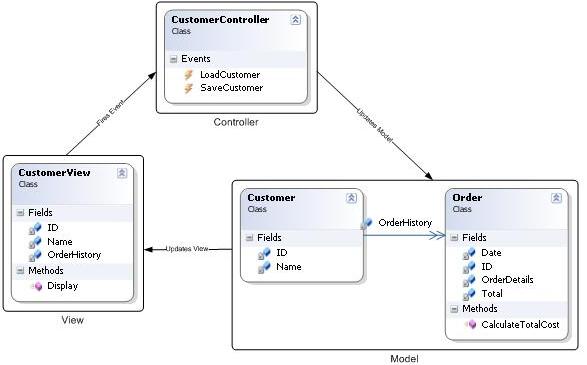
The MVC pattern is a UI presentation pattern that focuses on separating the UI (View) from its business layer (Model). The pattern separates responsibilities across three components: the view is responsible for rending UI elements, the controller is responsible for responding to UI actions, and the model is responsible for business behaviors and state management. In most implementation all three components can directly interact with each other and in some implementations the controller is responsible for determining which view to display (Front Controller Pattern),


Model View Presenter (MVP) Pattern


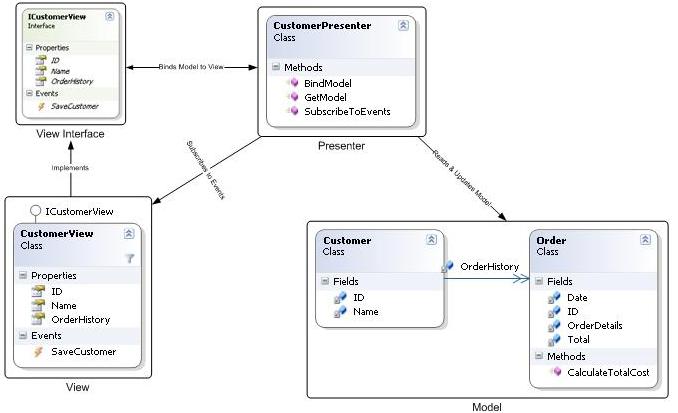
The MVP pattern is a UI presentation pattern based on the concepts of the MVC pattern. The pattern separates responsibilities across four components: the view is responsible for rending UI elements, the view interface is used to loosely couple the presenter from its view, the presenter is responsible for interacting between the view/model, and the model is responsible for business behaviors and state management. In some implementations the presenter interacts with a service (controller) layer to retrieve/persist the model. The view interface and service layer are commonly used to make writing unit tests for the presenter and the model easier.


Key Benefits


Before using any pattern a developers needs to consider the pros and cons of using it. There are a number of key benefits to using either the MVC or MVP pattern (See list below). But, there also a few draw backs to consider. The biggest drawbacks are additional complexity and learning curve. While the patterns may not be appropriate for simple solutions; advance solutions can greatly benefit from using the pattern. I’m my experience a have seen a few solutions eliminate a large amount of complexity but being re-factored to use either pattern.


·         Loose coupling – The presenter/controller are an intermediary between the UI code and the model. This allows the view and the model to evolve independently of each other.


·         Clear separation of concerns/responsibility


o    UI (Form or Page) – Responsible for rending UI elements


o    Presenter/controller – Responsible for reacting to UI events and interacts with the model


o    Model – Responsible for business behaviors and state management


·         Test Driven – By isolating each major component (UI, Presenter/controller, and model) it is easier to write unit tests. This is especially true when using the MVP pattern which only interacts with the view using an interface.


·         Code Reuse – By using a separation of concerns/responsible design approach you will increase code reuse. This is especially true when using a full blown domain model and keeping all the business/state management logic where it belongs.


·         Hide Data Access – Using these patterns forces you to put the data access code where it belongs in a data access layer. There a number of other patterns that typical works with the MVP/MVC pattern for data access. Two of the most common ones are repository and unit of work. (See Martin Fowler – Patterns of Enterprise Application Architecture for more details)


·         Flexibility/Adaptable – By isolating most of your code into the presenter/controller and model components your code base is more adaptable to change. For example consider how much UI and data access technologies have changed over the years and the number of choices we have available today. A properly design solution using MVC or MVP can support multi UI and data access technologies at the same time.


Key Differences


So what really are the differences between the MVC and MVP pattern. Actually there are not a whole lot of differences between them. Both patterns focus on separating responsibility across multi components and promote loosely coupling the UI (View) from the business layer (Model).  The major differences are how the pattern is implemented and in some advanced scenarios you need both presenters and controllers.


Here are the key differences between the patterns:


·         MVP Pattern


o    View is more loosely coupled to the model. The presenter is responsible for binding the model to the view.


o    Easier to unit test because interaction with the view is through an interface


o    Usually view to presenter map one to one. Complex views may have multi presenters.


·         MVC Pattern


o    Controller are based on behaviors and can be shared across views


o    Can be responsible for determining which view to display (Front Controller Pattern)


Hopefully you found this post interesting and it helped clarify the differences between the MVC and MVP pattern. If not, do not be discouraged patterns are powerful tools that can be hard to use sometimes. One thing to remember is that a pattern is a blue print and not an out of the box solutions. Developers should use them as a guide and modify the implementation according to their problem domain.

Difference between Synchronous and Asynchronous events

Synchronous:
Usually the methods are synchronous. That means that you call them, they gets executed. And when they finish you get the control back.
Synchronous methods will be the ones you use more often. They are easy to write and easy to use. In most of the cases they do the job just nice.

Asynchronous:
The asynchronous methods are different. You call them. They start executing, but return the control over the execution back to the thread which called them while they continue to execute in different thread.
Asynchronous methods have the advantage to not interrupt the program flow when a time consuming operation is needed. They are used a bit harder and have to be used carefully. You can not be sure that the execution of a method is finished, and the result is ready to use (unless you do checks). A good use is to call an asynchronous method, continue executing the application, and when the results of the method execution must be used, a loop like the one